
How to set up your Coreva Wake Band
Step-by-step instructions for your time, alarms and charging
One button. Two ways to press.
Short press: switch screens or adjust a value.
Long press (3 seconds): open a setting, confirm or move to the next step.
Display screens: 1 press = time and date, 2 = step count, 3 = calories, 4 = distance travelled.
The band returns to standby after about 5 seconds without a button press.
Many people also wear Coreva during the day. That is why it now includes activity tracking: steps, calories and distance travelled.
1. Set the time and date
- Open the time screen.
- Press and hold the button for 3 seconds. The hours will flash.
- Adjust the hours with short presses.
- Press and hold, then adjust the minutes with short presses.
- Continue in the same way: month → day → year.
- Select the 12-hour or 24-hour display format.
Check the time and your alarms before going to bed.
2. Set your height and weight
Many people enjoy wearing COREVA during the day too, so we have introduced step and activity tracking.
- After setting the year, press and hold for 3 seconds.
- Height (cm) will flash. Adjust it with short presses.
- Press and hold to move to weight.
- Adjust your weight (kg) with short presses.
- Confirm with a long press.
Activity readings are estimates.
Your details help the step counter estimate your activity.
3. Set a vibrating alarm
You can set three alarms without a phone or app. Initially, the alarms are displayed as A1OF, A2OF and A3OF.
- Select an alarm by pressing the button: 5 times = first alarm, 6 times = second, 7 times = third.
- Press and hold the button for 3 seconds.
- Adjust the hours with short presses.
- Press and hold, then adjust the minutes with short presses.
- Confirm with long presses.
Turning off an alarm and display modes
Turn an alarm off: open that alarm’s settings and press through the hours to 00:00 until OFF appears. The alarm is then switched off.
5OF: all display screens are enabled.
5ON: only the clock is shown. Your set alarms remain active.
4. Check the battery and charge
Check the battery: with the screen off, press and hold the button until the battery level appears as a percentage.
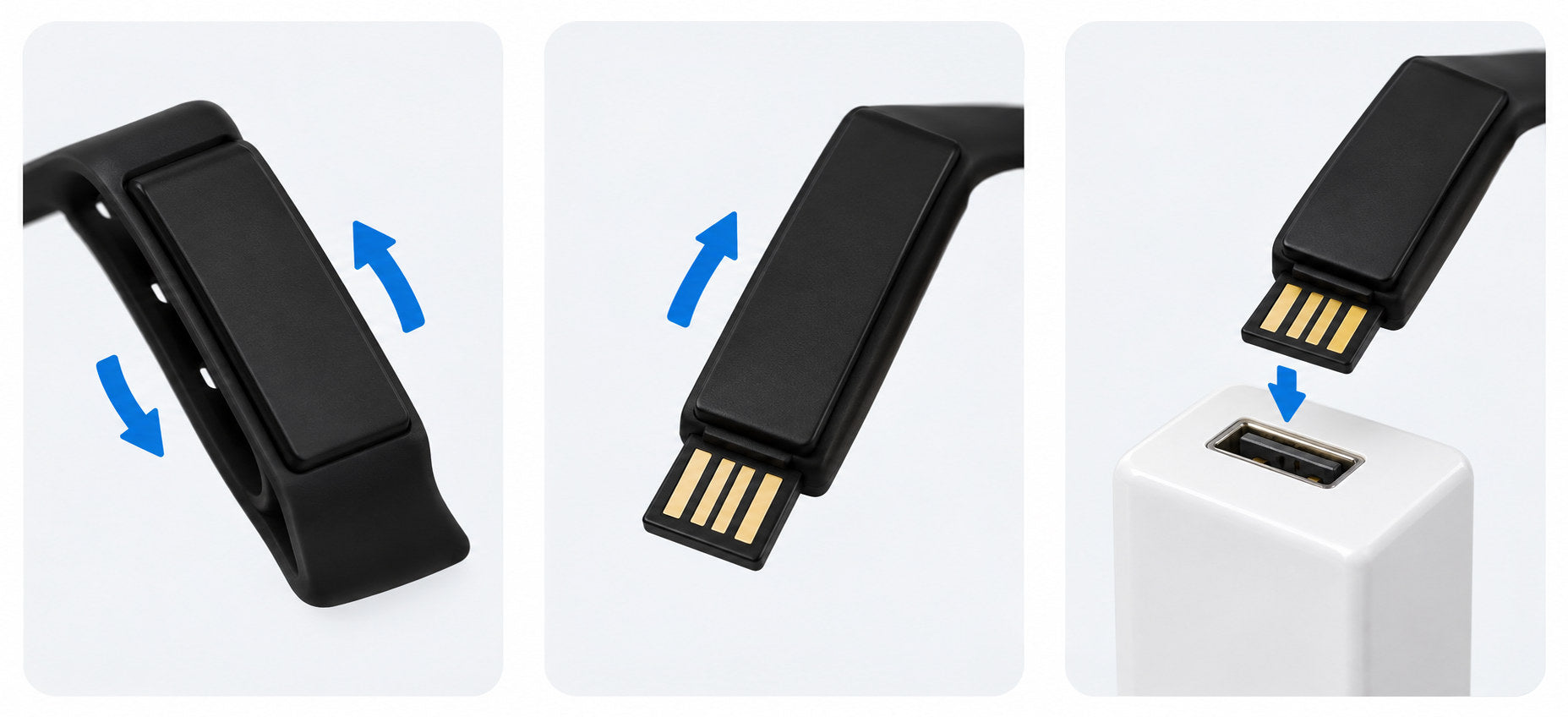
- Remove one end of the strap to reveal the USB connector.
- Connect the band to a 5 V USB-A charger or computer.
Flashing blue light: charging.
Light turns off: fully charged.
Charging takes about 30 minutes. According to the user manual, battery life is approximately 15 days, with around 30 days on standby.
Technical specifications
| Material | Silicone and ABS |
|---|---|
| Display / battery | LED / 55 mAh / DC 3.7 V |
| Battery life / standby | Approximately 15 / 30 days |
| Step counter | ±5% / up to 39,999 |
| Ambient pressure | 860–1060 hPa |
Need help?
We can help you get started: asiakaspalvelu@coreva.fi.
